Identify the user, the task and where the AI feature belongs. Agree on an outcome you can test, such as completing a document review with fewer corrections.

00Day
00hour
00Min
00Sec


Trusted by Business Partners Worldwide

E-Learning Platform

E-Learning Platform

CRM

Real Estate

Insurance

E-commerce

Real Estate

Learning

Medicine

E-commerce

E-commerce

E-Learning Platform

Property Landing

Mobile Apps

E-Learning Platform
AI Integrations We Can Build for Your Business
Where do people leave your software to find an answer, prepare a document or complete a task? These examples show how an AI feature could fit into that moment.
Plan Your First AI Integration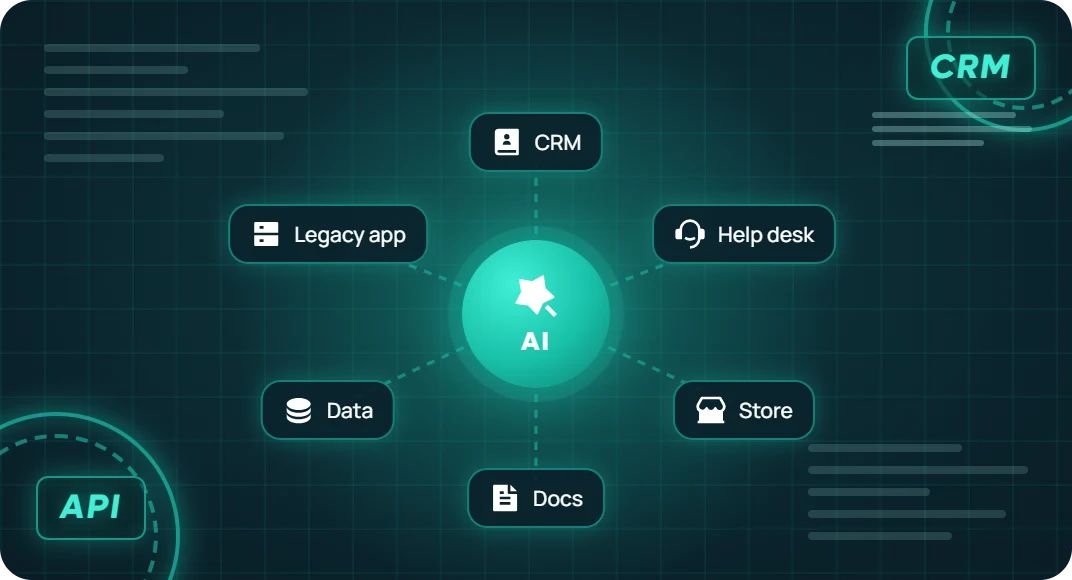

Generative AI and LLM Integration
Add drafting or summarization inside an existing app. For example, help a user turn project notes into a draft update they can check and edit before sharing.

CRM and Sales Tool Integration
Bring a summary of a customer’s recent interactions into the CRM record. Let the salesperson check the source notes and review a suggested follow-up before sending it.

Knowledge Base and AI Search Integration
Connect an app to approved manuals or help content. With retrieval-augmented generation (RAG), the feature can use relevant passages to answer a question and link back to the source.

E-commerce AI Integration
Help shoppers find relevant items using product descriptions and catalog information. For order-specific answers, connect the store API and verify access before showing customer details.

Help Desk and Support Integration
Put suggested replies and ticket summaries beside the support agent’s existing tools. Use relevant help articles and ticket details so the person handling the case can review the response.

Document Processing Integration
Add document upload and extraction to an internal application. Show the original invoice or form alongside the extracted fields so staff can correct them before saving.

Predictive Model Integration
Bring an existing model’s predictions into an operational dashboard. For example, show a demand estimate next to current stock, with the date it was generated and the information it used.

Legacy Application Integration
Assess how an older system can exchange data with an AI feature. Depending on the available interfaces, that might use an API, a scheduled export or a small service that connects the systems.
Why Choose ITclan BD for AI Integration?
Start With Your Existing Software
We review how your application works, where its data lives and which interfaces are available. That helps define what the first feature needs and which parts of the system require work.
Design for the People Using It
A summary or recommendation needs to appear where it helps someone complete a task. We plan the interface, source information and review step alongside the connection to the AI model.
Make the Integration Easier to Operate
We agree on usage limits, failure messages and who looks after the feature. Your team should know how to spot a failed request and what users can do when the AI service is unavailable.
Our Approach to AI Integration Services
We start with one feature and the systems it touches. Together we decide which data it needs, what a useful result looks like and how people can review or correct the output.
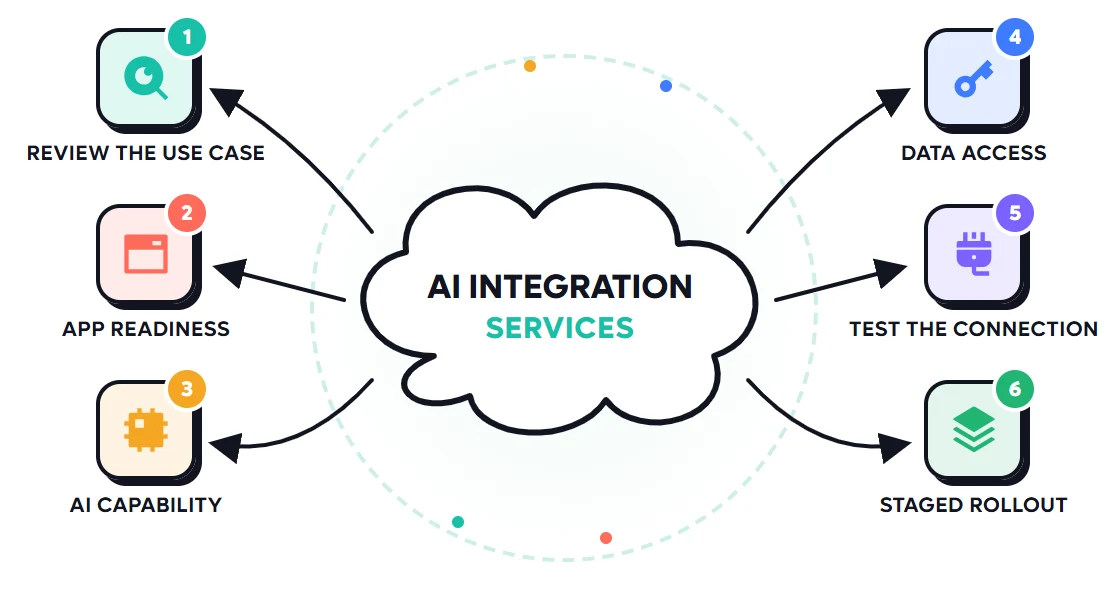
Specify which records the feature may use and which roles can access them. For SaaS products, design how each customer’s data stays within the correct account boundaries.
Review APIs, authentication, hosting and available data. Identify missing interfaces or changes needed before connecting the feature.
Check the feature from input to result. Include missing data, provider limits and failed requests, then define what the application shows when it cannot complete the task.
Compare the model or service against your examples, response-time needs and expected usage costs. Decide whether retrieval, a standard model or an existing custom model fits the task.
Release to an agreed audience first. Review output quality, response time and usage before making the feature available more widely.
How We Integrate AI With Your Software
Where AI Could Fit Into Your Software
Idea
Find Answers Inside Your Portal
Let users search approved documentation and open the passages behind an answer.
Work
Prepare Information for Review
Extract fields or draft a summary in the application where staff already check the work.
Team
Keep Relevant Context Together
Show support or sales staff the records they need alongside an editable suggested response.
Goal
Test One Feature Before Expanding
Compare output quality, task completion and operating cost during a limited release.
AI Integration Pricing
Your quote depends on the applications, data sources, access rules and feature requirements. We can separate the build from recurring model usage, hosting, software licences and support.

AI Integration Assessment
Custom Quote
Based on project scope
What’s included
Single-Feature AI Integration
Custom Quote
Based on project scope
What’s included
Custom AI System Integration
Custom Quote
Based on project scope
What’s included
AI Integration Assessment
Custom Quote
Based on project scope
What’s included
Single-Feature AI Integration
Custom Quote
Based on project scope
What’s included
Custom AI System Integration
Custom Quote
Based on project scope
What’s included
Frequently Asked Questions

What are AI integration services?
AI integration services connect an AI capability to existing software, data or business tools. The work can include APIs, authentication, data preparation, interface changes and tests that show how the feature performs in the application.
Do we need to replace our existing software?
We assess the current application first. If it supports suitable interfaces and data access, an AI feature can often be added within it. Older systems may need a connector, an export process or selected updates before integration is feasible.
Can you connect AI to our CRM, store or internal tools?
We can assess connections to those systems through their available APIs and permissions. The scope defines what the AI feature may read, what it can prepare and which updates require a person’s approval.
Can AI use our private documents and business data?
Yes, where the sources and deployment approach support your access requirements. We define what may be retrieved or sent to the provider, how users are authorized and what is retained. Sensitive sources and retention needs should be reviewed during scoping.
Do we need to train a custom model?
Many features can use an existing model. Retrieval can help it answer from your documents, while fine-tuning may help with task-specific behavior. We assess whether model development is needed after testing the simpler options against your use case.
What happens if the AI service is slow or unavailable?
The integration can use timeouts, usage limits and safe retries where appropriate. The application can show a clear error, let the user try again or offer another way to complete the task. We agree on that behavior before launch.
How much does AI integration cost and how long does it take?
Adding a summary feature to one app is a smaller project than connecting multiple systems with different access rules. We estimate cost and timing after reviewing the interfaces, data preparation, testing and release requirements. Recurring usage and support can be listed separately.
Can you maintain the integration after launch?
Maintenance can be included in scope. It may cover failed requests, API changes, model updates and quality checks. We agree on who monitors the feature and what happens when an external provider changes its service.
Best Service ✳ 5.0 (24k+ Reviews)
Testimonials from Our Business Partners
I continue to be impressed by ITclan work. What a wonderful work, They have created master pieces for me, thanks.

Have worked with ITclan before, and will again. Everything was done as instructed and they even helped solve an issue that was not originally specified clearly enough in the order.

A pleasure to work with ITclan BD, not only did a great job but put up with all my questions, issues and concerns. Will be using them again and again.

You made it so simple. My new site is so much faster and easier to work with than my old site. I just choose the page, make the change and click save. Thanks, ITclan BD!

ITclan BD's owner and his team understand in a short time what exactly you want. Has a very experienced team. Communication is very good

"ITclan BD has been a pleasure to work and collaborate with for nearly 8 months. They are a talented team and their communication is spot on. I look forward to working with them on many more."

Where Would AI Help in Your Existing Software?
Tell us what you use today and what you want users to do more easily. We’ll discuss the first feature and the connections it needs.