Choose a task that repeats often, has a clear owner and produces a result your team can check. Agree on what a useful pilot should show.


Trusted by Business Partners Worldwide

E-Learning Platform

E-Learning Platform

CRM

Real Estate

Insurance

E-commerce

Real Estate

Learning

Medicine

E-commerce

E-commerce

E-Learning Platform

Property Landing

Mobile Apps

E-Learning Platform
Types of AI Agents We Build
Think about a task that makes your team open three tabs, check a record and decide what to do next. Here are eight ways an AI agent could help.
Plan Your First AI Agent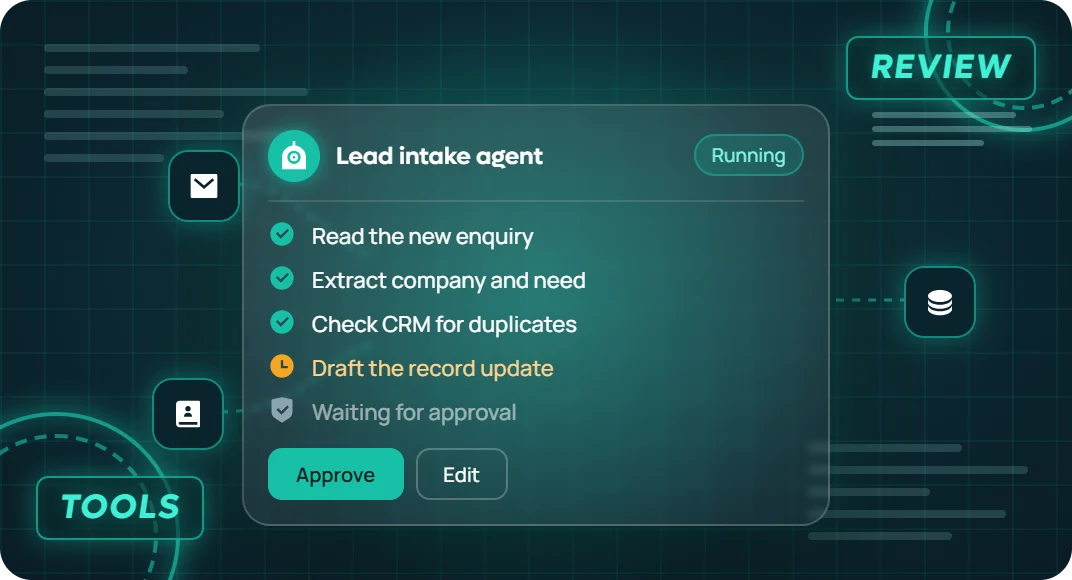

Customer Support Agents
When a delivery complaint needs more than a standard reply, an agent can look up the order and shipping history, prepare the next step and route refund requests to a person with approval authority.

Sales and CRM Agents
When leads arrive by email, an agent can extract the company and enquiry details, check for an existing CRM record and prepare an update for your sales team to review.

Invoice and Document Review Agents
When invoices and purchase orders arrive in different formats, an agent can extract key fields, compare them with the relevant records and flag mismatches for finance to review.

E-commerce Operations Agents
When a stock issue affects an order, an agent can check availability, identify affected orders and create a task for your fulfilment team with the details it needs.

IT Service Desk Agents
When an internal ticket lacks enough detail, an agent can ask for the missing information, check approved troubleshooting notes and assign the ticket to the right queue.

Research and Reporting Agents
When a weekly report depends on several sources, an agent can gather approved data, flag gaps and draft a report with links to the records behind its findings.

Employee Onboarding Agents
When a new hire’s setup spans several tools, an agent can check which onboarding tasks are complete and prepare reminders for the people responsible. Account access requests can go through your normal approval process.

In-App Task Agents
When users need several steps to finish a task in your product, an agent can guide them through it. For example, a user can ask it to prepare a project report, review what it gathered and confirm before exporting.
Why Build Your AI Agent With ITclan BD?
Start With a Task You Can Measure
We start with one task your team already understands. Together we define a correct result and what to measure, such as time saved, how often someone needs to intervene or the cost per completed task.
Decide What the Agent Can Do
We agree on what the agent may read, which low-risk actions it can take and what requires approval. For example, it could prepare a CRM update and show the proposed changes before anyone saves them.
See What Happened on Each Run
An action history can show which systems the agent used, what changed and who approved it. When a step fails, your team can see where the task stopped and decide how to continue.
Our Approach to AI Agent Development Services
We map how your team does the work today, including the exceptions. That helps us decide where fixed rules are enough and where an agent needs to choose the next step.
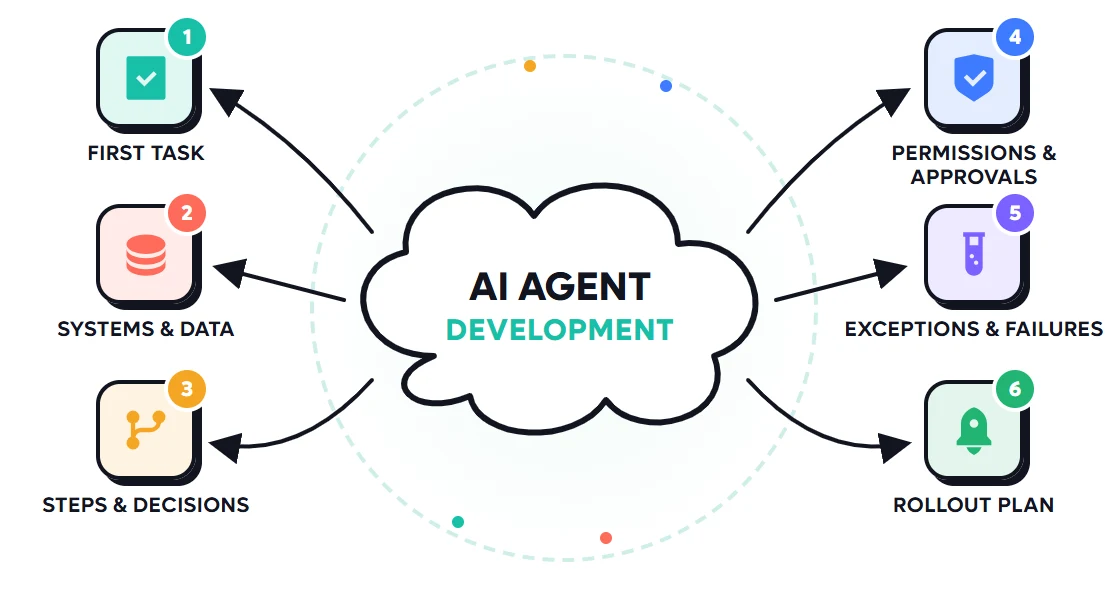
Give the agent only the access it needs. For sensitive actions, show the reviewer what would happen and wait for their decision before making the change.
Review the applications, APIs and records involved. Identify which actions each system supports and where access is restricted.
Use real examples, including missing records, duplicate requests and unavailable integrations. Check that an uncertain or incomplete run reaches the right person with enough context.
Define when the agent should look up information, use a tool, ask a question or stop. Use fixed rules where the outcome needs to follow a defined policy.
Start with suggestions or a limited set of actions. Agree on who reviews logs, when the agent should be paused and what results would justify more access.
How We Build and Launch Your AI Agent
Where an AI Agent Can Help First
Idea
Gather Information Across Tools
Bring related order, delivery and ticket details into one place before someone investigates a complaint.
Work
Prepare Routine Updates
Collect details from a new enquiry and show your team the proposed CRM update for review.
Team
Route Exceptions to the Right Person
Send an invoice mismatch to the person who can resolve it, with the records they need to compare.
Goal
Prove One Workflow Before Expanding
Compare pilot results with the way your team works today. Look at correct completions, review time and operating cost.
AI Agent Development Pricing
Your quote depends on the task, systems involved, approval requirements and expected usage. We can itemize the build separately from recurring model, hosting and support costs.

AI Agent Proof of Concept
Custom Quote
Based on project scope
What’s included
Single-Workflow AI Agent Pilot
Custom Quote
Based on project scope
What’s included
Custom AI Agent System
Custom Quote
Based on project scope
What’s included
AI Agent Proof of Concept
Custom Quote
Based on project scope
What’s included
Single-Workflow AI Agent Pilot
Custom Quote
Based on project scope
What’s included
Custom AI Agent System
Custom Quote
Based on project scope
What’s included
Frequently Asked Questions

What are AI agent development services?
AI agent development services cover planning, building, testing and deploying software that uses AI to select steps and use approved tools to complete a task. The service can include integrations, human approvals and monitoring.
What’s the difference between an AI agent and a chatbot?
A chatbot is designed around conversation. An AI agent is designed around completing a task, such as checking an order and opening a support ticket. A chatbot can serve as the interface for an agent, and an agent can also start from an event such as a new invoice.
When should I use an AI agent instead of standard automation?
Use standard automation when the inputs and next steps follow clear rules. Consider an agent when requests vary, information comes from several tools or the system needs to choose among a defined set of actions. Both can work together in the same process.
Can the agent connect to my existing systems?
We can scope connections to your CRM, help desk, store or internal tools. The available actions depend on your APIs and account permissions. A pilot can begin with read-only access so your team can review results before allowing updates.
How do you prevent unauthorized or duplicate actions?
We define allowed actions and enforce access at the integration layer. Where needed, we add human approval and use request or record identifiers to avoid repeating a change during a retry. If an outcome is uncertain, the agent can stop and send the case for review.
Can I start with one agent before building a multi-agent system?
Yes. Start with one task and one agent where possible. Multiple agents can make sense when responsibilities or permissions need to be separated. We review that choice against the extra testing and maintenance it introduces.
How much does a custom AI agent cost and how long does it take?
A read-only prototype is a smaller build than an agent that updates multiple systems and needs approvals. We estimate cost and timing after reviewing the task, API access, testing needs and rollout plan. Recurring costs depend in part on how often the agent runs and which tools it uses.
What happens after the agent goes live?
We agree on who monitors runs and handles exceptions. Ongoing support can include reviewing failed tasks, re-testing after changes and updating the agent as your systems or procedures change.
Best Service ✳ 5.0 (24k+ Reviews)
Testimonials from Our Business Partners
I continue to be impressed by ITclan work. What a wonderful work, They have created master pieces for me, thanks.

Have worked with ITclan before, and will again. Everything was done as instructed and they even helped solve an issue that was not originally specified clearly enough in the order.

A pleasure to work with ITclan BD, not only did a great job but put up with all my questions, issues and concerns. Will be using them again and again.

You made it so simple. My new site is so much faster and easier to work with than my old site. I just choose the page, make the change and click save. Thanks, ITclan BD!

ITclan BD's owner and his team understand in a short time what exactly you want. Has a very experienced team. Communication is very good

"ITclan BD has been a pleasure to work and collaborate with for nearly 8 months. They are a talented team and their communication is spot on. I look forward to working with them on many more."

What Task Should Your AI Agent Take On?
Tell us how your team handles the task today, which tools it uses and where the work gets stuck. We’ll discuss what to test in a pilot.