Identify what starts the work, which tools are involved and who owns each handoff. Walk through both a typical case and one that got stuck.


Trusted by Business Partners Worldwide

E-Learning Platform

E-Learning Platform

CRM

Real Estate

Insurance

E-commerce

Real Estate

Learning

Medicine

E-commerce

E-commerce

E-Learning Platform

Property Landing

Mobile Apps

E-Learning Platform
Business Workflows We Can Automate
Start with a process that keeps people waiting or asks them to enter the same information twice. These examples show where automation can help and where your team stays involved.
Plan Your First Automation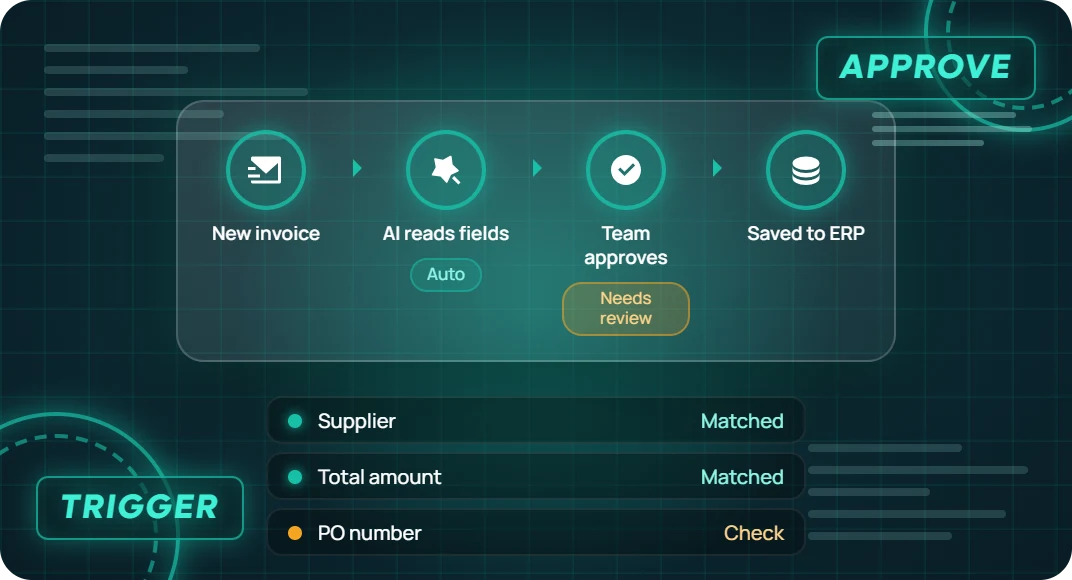

Lead Intake and CRM Updates
When an enquiry arrives, extract the contact and request details, check for an existing CRM record and route it to the right salesperson. Send incomplete or conflicting details to a review queue.

Invoice and Purchase Order Processing
Read invoice fields from an attachment and compare them with the relevant purchase order. Flag missing or mismatched details for finance to review before the invoice moves forward.

Purchase and Expense Approvals
Route a request based on its amount, department or budget owner. Remind the assigned reviewer, record the decision and send rejected or overdue requests to the agreed next step.

Customer Support Ticket Routing
Classify a new email or ticket by topic, add relevant details and route it to the right queue. Send unclear requests to a person who can confirm where they belong.

E-commerce Order and Inventory Workflows
When an order changes, pass the approved status to the systems that need it. If stock is short or a shipment update fails, create a task for your fulfilment team to check.

Employee Onboarding Workflows
When a start date is confirmed, create onboarding tasks for HR, IT and the manager. Track what is complete, remind task owners and keep account access under your normal approval process.

Sales and Operations Reporting
On a schedule, pull agreed figures from your tools, apply consistent calculations and draft a summary. Flag missing sources so someone can check the report before sharing it.

Document Intake and Filing
When a form or attachment arrives, identify the document type, extract key details and send it to the right folder or queue. Ask for review if the file is unreadable or required information is missing.
Why Automate Your Workflows With ITclan BD?
Start Where Work Gets Stuck
We trace a real request from start to finish with the people who handle it. That shows which steps create delays, where information is re-entered and what a first automation should fix.
Keep Your Business Rules in Charge
We map who approves each action and what happens when information is missing. AI can read an attachment or suggest a category while the workflow applies your rules for routing and approval.
Give Your Team a Clear View of Each Run
Your team can see where a request is waiting, what happened and which step needs attention. We agree on which events to record and what happens if a connected system is unavailable.
Our Approach to AI Workflow Automation Services
We start with the way your team works today. Together we decide which steps can follow rules, where AI can handle variable inputs and which decisions should stay with a person.
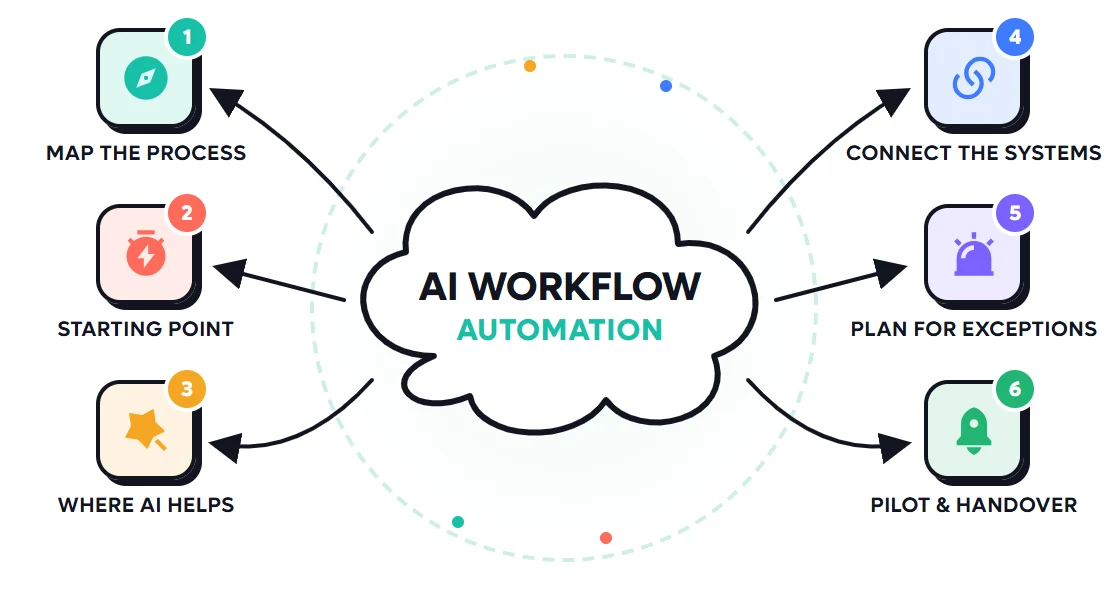
Review your APIs, connectors and access permissions. Agree which systems provide each field and which one should receive the final update.
Agree on a baseline such as turnaround time, manual touches or correction rate. Use it to compare the pilot with your current process.
Decide when to retry, when to stop and who should take over. Check for duplicate submissions and avoid repeating a change if the first attempt already succeeded.
Use rules for steps with clear conditions, such as approvals based on order value. Use AI for tasks such as classifying a free-text request or reading varied document layouts.
Run the workflow with a limited group or volume. Review the results, show the team how to handle failures and agree on who owns the workflow after launch.
How We Build and Launch Your Workflow Automation
Where Workflow Automation Can Help First
Idea
Stop Entering the Same Data Twice
Capture a request once and pass the validated details to the tools your team uses.
Work
Move Approvals Along
Send requests to the assigned reviewer, show what needs a decision and track overdue items.
Team
Make Exceptions Easier to Resolve
Give the person taking over the original request, the failed step and the records they need to check.
Goal
Measure the Change
Compare turnaround time and manual touches before and after the pilot. Review corrections and exceptions before expanding.
AI Workflow Automation Pricing
Your quote depends on the number of workflows and systems, the approval rules, the quality of the inputs and the expected volume. We can separate the build from recurring platform, AI usage, hosting and support costs.

Workflow Assessment and Prototype
Custom Quote
Based on project scope
What’s included
Single-Workflow Automation Pilot
Custom Quote
Based on project scope
What’s included
Multi-Workflow Automation
Custom Quote
Based on project scope
What’s included
Workflow Assessment and Prototype
Custom Quote
Based on project scope
What’s included
Single-Workflow Automation Pilot
Custom Quote
Based on project scope
What’s included
Multi-Workflow Automation
Custom Quote
Based on project scope
What’s included
Frequently Asked Questions

What are AI workflow automation services?
AI workflow automation services design, build and connect the steps in a recurring business process. A trigger starts the workflow, rules control what happens next, and AI can help with tasks such as reading documents or sorting requests.
What is a good first workflow to automate?
Choose a frequent process with a clear start, a known owner and a result you can check. Lead routing, invoice intake and recurring reports can be good candidates when the required data and system access are available.
How is workflow automation different from an AI agent?
A workflow follows defined steps and rules. An AI agent can choose among approved actions to reach a goal. You can use an agent for one step inside a workflow while keeping approvals and record updates under defined rules.
Can you connect the tools we already use?
We can assess connections to your CRM, store, help desk, accounting software and internal tools. What can be read or updated depends on the available APIs or connectors and the permissions you grant.
Can people still approve important actions?
Yes. The workflow can pause before it updates a sensitive record, sends a message or moves a request forward. Reviewers can see the relevant details and approve, reject or send the request back.
What happens when a workflow fails or receives incomplete information?
The workflow can record the failure, retry a temporary error where safe or send the case to a person. We define how to check whether an earlier update succeeded before replaying a failed run.
How much does AI workflow automation cost and how long does it take?
A workflow inside one tool is usually simpler than a process spanning several systems with custom approvals. We estimate cost and timing after reviewing the steps, integrations, exceptions and testing needs. Ongoing software and usage costs can be listed separately.
How do we know whether the automation is helping?
Measure a typical workload before the pilot, then compare turnaround time, manual touches and correction rates. Also review how often the workflow stops for exceptions so the team can decide whether to improve or expand it.
Best Service ✳ 5.0 (24k+ Reviews)
Testimonials from Our Business Partners
I continue to be impressed by ITclan work. What a wonderful work, They have created master pieces for me, thanks.

Have worked with ITclan before, and will again. Everything was done as instructed and they even helped solve an issue that was not originally specified clearly enough in the order.

A pleasure to work with ITclan BD, not only did a great job but put up with all my questions, issues and concerns. Will be using them again and again.

You made it so simple. My new site is so much faster and easier to work with than my old site. I just choose the page, make the change and click save. Thanks, ITclan BD!

ITclan BD's owner and his team understand in a short time what exactly you want. Has a very experienced team. Communication is very good

"ITclan BD has been a pleasure to work and collaborate with for nearly 8 months. They are a talented team and their communication is spot on. I look forward to working with them on many more."

Which Workflow Is Slowing Your Team Down?
Tell us what starts the work, which tools it moves through and where it usually gets stuck. We’ll discuss what to automate first.